

Invites are the most annoying notifications you can get, especially when you don’t want one. Meta apps have been in the news because of the ‘channel’ adoption everywhere. All I see are channel invites from everyone. But don’t worry, we’ve steps to turn these notifications off. Facebook Messenger is the latest app to get these channels.
Before you begin, update the Messenger app from the App Store or Google Play.
Follow these steps to disable Channel invites on Facebook Messenger.
- Open Facebook Messenger Settings
- Now, navigate to ‘Preferences’ and open ‘Notifications & sounds’
- Now, turn off ‘Channel Invitations’ from these settings

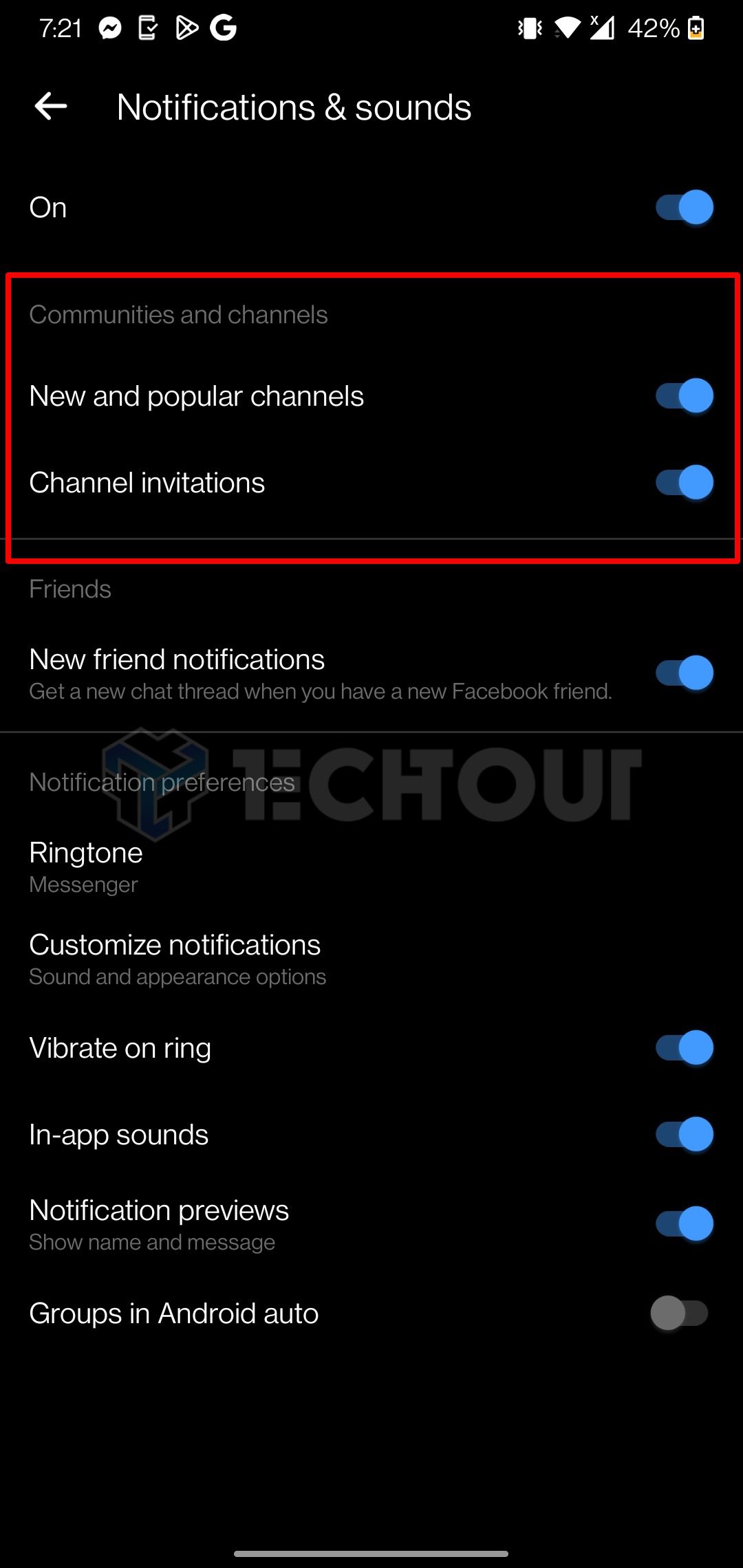
That’s how you can quickly turn off channel invites and notifications on Facebook Messenger.



























I don’t have that section and the app is up to date.
Are you an iPhone or Android user? There are a few things you can try.
For Android users, clearing the cache of the app can often help.
If you’re using an iPhone, unfortunately, you’ll have to wait for the latest update to be released.
Another option is to turn off all notifications for Messenger from your device’s system-level settings, though this will disable notifications for the app entirely.
No signs of these options in the iPhone, yet.